kooora world

  • 22/2/2016 - 7:35 م

    ريال مدريد
    3-2
    روما
javascript:void(0)

Popular Posts

What’s Hot

Showing posts with label Windows. Show all posts
From the beginning of the establishment of the Code of Crazy Net and we are constantly talking about the system and Windows and sometimes Mac and almost, because never talk about  system due to non-proliferation and the horror that lies to the hearts of users and especially Arabs when we tell them the Linux operating system tells you I am, because I could never work because it's difficult not to use the English language and also fund orders in Linux, which when you think about it you feel intimidated by the system before even understand and convince yourself because you may never understand.

  • What is the Linux system:
Linux system is run like any other operating system like Windows and Mac and some other systems, third-party system known but always I say that Linux is or operating systems because it is the first operating system built and has been built by some other operating systems like Windows and Mac and other and we talked about the difference between all operating systems in the former subject of a comparison between the best Windows operating system and Mac & Nix and in this comparison we explained what the most important advantages and disadvantages of each system for this and it is important previous topic View even know the difference between each system and there are some points which we will Ptodahaa and around the Linux system fully.
It works on all computers:
Almost Linux system works on all computers and on any piece of internal computer without any problems
  • Free Linux system:
Linux is a free system of open source in the sense that it is not owned by the company promotes him but anyone can open and modifications to the system and the establishment of a distribution to him and have explained this earlier on how to set up your Linux distribution private explain create your bistro for Linux without software because it is not as it is difficult at the moment because there are some sites that help and explanations on this

  • It does not need definitions:
Linux does not need to almost definitions, but all the computers, which used before and you Pasties Linux system it did not need to define anything because he is the definition of his own for all the internal parts of the Hanson and the completion of the terracing system distance you will see the Internet works you have without any problem.
  • It wit works on vulnerable devices:
Of course this is an important question for some people who are already responding to move or change the Windows system to any other system, especially Linux always asking if it is compatible with the devices and runs on vulnerable device or not . Very Bouktsar if you have on your system RAM 512 KB will work for a Linux system you have and if you have 4 GB of Rama because of the tremendous speed and agility system and almost does not feel any problem in spasm or Thence system because it is very light system
Since the beginning of 2004 until the present time, and we hear some misconceptions about Linux system that only hackers, not for ordinary users and always needed enter orders on the system so I can deal with it and also I can not use the software it

If you're dealing with the Mac OS X system, you will find that the Linux system like him dramatically, especially bistro Ubuntu and is bistro and a better distribution of Linux you have to deal with them and use them, and this is what will explain it in threads coming to the way Tstaibh and turn it on and everything around him

  • Can I terracing on Linux software?
  • Yes, we can repeat terracing programs on Linux but not Windows system software, but rather a private system Linux software, where you download the software from a store available on the system so as not to look each what the program is doing and uploaded without any problems and to read also there are other ways will be the oldest in next explanations on how to run all Windows
  • programs on Linux :

Can I run the games on a Linux system?
Previously, it can not because that was a Linux system is well-known, but at the moment he became you can because there are some large companies began to create some files and programs that you can run games on the Linux system and also became there are some ways that you-tested personally and run some Windows games already, and better than the Windows system also.

All you want to know about the Linux operating system and the simple concept 2016

From the beginning of the establishment of the Code of Crazy Net and we are constantly talking about the system and Windows and sometimes Mac and almost, because never talk about  system due to non-proliferation and the horror that lies to the hearts of users and especially Arabs when we tell them the Linux operating system tells you I am, because I could never work because it's difficult not to use the English language and also fund orders in Linux, which when you think about it you feel intimidated by the system before even understand and convince yourself because you may never understand.

  • What is the Linux system:
Linux system is run like any other operating system like Windows and Mac and some other systems, third-party system known but always I say that Linux is or operating systems because it is the first operating system built and has been built by some other operating systems like Windows and Mac and other and we talked about the difference between all operating systems in the former subject of a comparison between the best Windows operating system and Mac & Nix and in this comparison we explained what the most important advantages and disadvantages of each system for this and it is important previous topic View even know the difference between each system and there are some points which we will Ptodahaa and around the Linux system fully.
It works on all computers:
Almost Linux system works on all computers and on any piece of internal computer without any problems
  • Free Linux system:
Linux is a free system of open source in the sense that it is not owned by the company promotes him but anyone can open and modifications to the system and the establishment of a distribution to him and have explained this earlier on how to set up your Linux distribution private explain create your bistro for Linux without software because it is not as it is difficult at the moment because there are some sites that help and explanations on this

  • It does not need definitions:
Linux does not need to almost definitions, but all the computers, which used before and you Pasties Linux system it did not need to define anything because he is the definition of his own for all the internal parts of the Hanson and the completion of the terracing system distance you will see the Internet works you have without any problem.
  • It wit works on vulnerable devices:
Of course this is an important question for some people who are already responding to move or change the Windows system to any other system, especially Linux always asking if it is compatible with the devices and runs on vulnerable device or not . Very Bouktsar if you have on your system RAM 512 KB will work for a Linux system you have and if you have 4 GB of Rama because of the tremendous speed and agility system and almost does not feel any problem in spasm or Thence system because it is very light system
Since the beginning of 2004 until the present time, and we hear some misconceptions about Linux system that only hackers, not for ordinary users and always needed enter orders on the system so I can deal with it and also I can not use the software it

If you're dealing with the Mac OS X system, you will find that the Linux system like him dramatically, especially bistro Ubuntu and is bistro and a better distribution of Linux you have to deal with them and use them, and this is what will explain it in threads coming to the way Tstaibh and turn it on and everything around him

  • Can I terracing on Linux software?
  • Yes, we can repeat terracing programs on Linux but not Windows system software, but rather a private system Linux software, where you download the software from a store available on the system so as not to look each what the program is doing and uploaded without any problems and to read also there are other ways will be the oldest in next explanations on how to run all Windows
  • programs on Linux :

Can I run the games on a Linux system?
Previously, it can not because that was a Linux system is well-known, but at the moment he became you can because there are some large companies began to create some files and programs that you can run games on the Linux system and also became there are some ways that you-tested personally and run some Windows games already, and better than the Windows system also.


Happy Eid every year and enlightened thought and heart and comfort in mind relaxed and the whole entity on some of the happiness and tender


On the occasion of Eid al-Fitr 2016

Happy Eid every year and enlightened thought and heart and comfort in mind relaxed and the whole entity on some of the happiness and tender


In the market a large number of tablets Tablet PCs, of course, we can not be identified, but some of these devices can be regarded as Balfajrh or leading, but the only drawback is the high price. In return we will get fast performance, distinctive screens, exquisite designs, as well as quality.
Among these computers Achterlna list we hope that you like it:
1- Galaxy Tab S2
A less tablet thickness where is light weight and thin design and is available in two sizes first and second 8-inch 9.7-inch Samsung has launched this category to compete directly for Ouhaat iPad to Apple. These devices with flat-screen Super AMOLED 2048 × 1536 pixels accurately and eight-core processors and random access memory RAM size 3 GB and 8-megapixel camera background front camera and 2.1-megapixel resolution and works by issuing Android 5.0 to the Crown Bob thickness of 5.6 meters Millie.
2- iPad Pro
This 13-inch tablet size and provide Apple with a keyboard and pen Apple Pencil in order to convert it to a portable computer with a touch screen. This tablet screen 9.7-inch 2048 × 2732 pixels accurately and A9X processor and 4 GB memory and a camera 8 megapixels background front and another accurately 1.2 megapixels and is running a iOS 9 with a thickness of 6.9 meters Millie.
3- Google Pixel C
It is a better and stronger tablets in the market and structured manufacturer of aluminum and provide him with the QWERTY keyboard becomes the most beautiful in form and design. This 10.2-inch screen tablet work precisely 2560 × 1800 pixel processor NVIDIA Tegra X1 memory and 3 GB as a camera background accuracy 8 megapixels front camera and 2-megapixel resolution and runs Android 6.0, the latest version Marschmilo Android 6.0 Marshmallow.
4. Tablet Microsoft Surface Pro 4
As a result provide high Atadah specifications can this dedicated tablet for students as well as for business considered especially as he is running Windows 10 "Windows 10", this tablet provider 12.3 inch screen working in 2736 precisely × 1824 and operates generation VI processors Intel Skylake and memory up to 16 GB storage capacity SSD is a disk with a capacity of up to 1 terabyte.

Best leading tablets 2016

In the market a large number of tablets Tablet PCs, of course, we can not be identified, but some of these devices can be regarded as Balfajrh or leading, but the only drawback is the high price. In return we will get fast performance, distinctive screens, exquisite designs, as well as quality.
Among these computers Achterlna list we hope that you like it:
1- Galaxy Tab S2
A less tablet thickness where is light weight and thin design and is available in two sizes first and second 8-inch 9.7-inch Samsung has launched this category to compete directly for Ouhaat iPad to Apple. These devices with flat-screen Super AMOLED 2048 × 1536 pixels accurately and eight-core processors and random access memory RAM size 3 GB and 8-megapixel camera background front camera and 2.1-megapixel resolution and works by issuing Android 5.0 to the Crown Bob thickness of 5.6 meters Millie.
2- iPad Pro
This 13-inch tablet size and provide Apple with a keyboard and pen Apple Pencil in order to convert it to a portable computer with a touch screen. This tablet screen 9.7-inch 2048 × 2732 pixels accurately and A9X processor and 4 GB memory and a camera 8 megapixels background front and another accurately 1.2 megapixels and is running a iOS 9 with a thickness of 6.9 meters Millie.
3- Google Pixel C
It is a better and stronger tablets in the market and structured manufacturer of aluminum and provide him with the QWERTY keyboard becomes the most beautiful in form and design. This 10.2-inch screen tablet work precisely 2560 × 1800 pixel processor NVIDIA Tegra X1 memory and 3 GB as a camera background accuracy 8 megapixels front camera and 2-megapixel resolution and runs Android 6.0, the latest version Marschmilo Android 6.0 Marshmallow.
4. Tablet Microsoft Surface Pro 4
As a result provide high Atadah specifications can this dedicated tablet for students as well as for business considered especially as he is running Windows 10 "Windows 10", this tablet provider 12.3 inch screen working in 2736 precisely × 1824 and operates generation VI processors Intel Skylake and memory up to 16 GB storage capacity SSD is a disk with a capacity of up to 1 terabyte.

Mohamed Bnkir
All Taatmlkna puzzling when buying a new laptop, choose any brand and any brand is right for me ???? ... As Markian months in the Arab market are Dell, Hp will review with you, dear reader, the most important differences between them, and which is better Dell or Hp?
Comparison will be in terms of efficiency, Skin and external shape, weight, battery life, price, quality of materials used in the industry
In terms of efficiency:
May resemble a lot of laptops in terms of efficiency when use is limited to simple things such as watching movies or Tsqah online,
But the real test comes when the hard use in editing videos or playing games or using high graphics programs such as After Effects. Through my personal experience I can confidently tell you or that Dell computers are the best in terms of efficiency,
Through experience also it became clear that there is a very big disadvantage in the production line is the height Hp Alaptob heat when running some programs may have to work shutdown forced to reduce the temperature, and this is a very big disadvantage can not be overlooked.
In terms of weight:
Weight is a big problem facing the company Hp, and when comparing the two devices to the laptop of the same class-price'll find that the Dell laptop is much lighter than a laptop Hp, and as the weight of the most important things you should take into consideration when buying a new laptop,
I swage Dell in this matter, in the end, you do not want a heavy laptop hard-drive you anywhere you go
Battery Life:
If you have used a laptop Hp before you will know that barely battery capacity up to an hour and a half after a short period of use, while the average capacity battery Dell up to two hours, sometimes up to two hours and a half, and also the battery of the important things you should take them into account, mainly Alaptob the advantage is the possibility to run for some time without the need for a power source
External, so outweigh the balance of Dell hand again.
In terms of form:
Here tastes vary, so be Mncefna the stake likely to somewhat hand Hp, there are a lot of designs and Alastylat you'll find in the brand Hp, but this does not mean that Dell lacks that, but there are also many designs'll find in Dell's
In terms of price:
There really is not much difference in price when buying a laptop in the same possibilities ill or the Dell brand. The Hp there is a slight difference in price but not almost no difference.
The quality of materials used:
You certainly do not want to laptop crisp, with the first Messier break down and Aattb and you can not use it, and also do not want the laptop manufacturer of materials R_khasah crust quickly and becomes a form of Alaptob ugly Osi extremely Through my experience I can tell you with confidence that Hp devices unfortunately crust and stunning color and become after a bad appearance was ashamed to take it with you outside the home.

While that Dell is very, very concerned with the quality of materials used in industry and Dell computers can bear Btat excellently, and the paint is not flaking of them easily.

Stay away from Hp as much as possible, and definitely purchase a brand Dell, they are the same price and better in terms of manufacturing materials, heat Alaptob when hard to use the same degree of Hp, and much lighter in weight does not go up and bear shocks better than Hp

Dell is better or Hp

Mohamed Bnkir
All Taatmlkna puzzling when buying a new laptop, choose any brand and any brand is right for me ???? ... As Markian months in the Arab market are Dell, Hp will review with you, dear reader, the most important differences between them, and which is better Dell or Hp?
Comparison will be in terms of efficiency, Skin and external shape, weight, battery life, price, quality of materials used in the industry
In terms of efficiency:
May resemble a lot of laptops in terms of efficiency when use is limited to simple things such as watching movies or Tsqah online,
But the real test comes when the hard use in editing videos or playing games or using high graphics programs such as After Effects. Through my personal experience I can confidently tell you or that Dell computers are the best in terms of efficiency,
Through experience also it became clear that there is a very big disadvantage in the production line is the height Hp Alaptob heat when running some programs may have to work shutdown forced to reduce the temperature, and this is a very big disadvantage can not be overlooked.
In terms of weight:
Weight is a big problem facing the company Hp, and when comparing the two devices to the laptop of the same class-price'll find that the Dell laptop is much lighter than a laptop Hp, and as the weight of the most important things you should take into consideration when buying a new laptop,
I swage Dell in this matter, in the end, you do not want a heavy laptop hard-drive you anywhere you go
Battery Life:
If you have used a laptop Hp before you will know that barely battery capacity up to an hour and a half after a short period of use, while the average capacity battery Dell up to two hours, sometimes up to two hours and a half, and also the battery of the important things you should take them into account, mainly Alaptob the advantage is the possibility to run for some time without the need for a power source
External, so outweigh the balance of Dell hand again.
In terms of form:
Here tastes vary, so be Mncefna the stake likely to somewhat hand Hp, there are a lot of designs and Alastylat you'll find in the brand Hp, but this does not mean that Dell lacks that, but there are also many designs'll find in Dell's
In terms of price:
There really is not much difference in price when buying a laptop in the same possibilities ill or the Dell brand. The Hp there is a slight difference in price but not almost no difference.
The quality of materials used:
You certainly do not want to laptop crisp, with the first Messier break down and Aattb and you can not use it, and also do not want the laptop manufacturer of materials R_khasah crust quickly and becomes a form of Alaptob ugly Osi extremely Through my experience I can tell you with confidence that Hp devices unfortunately crust and stunning color and become after a bad appearance was ashamed to take it with you outside the home.

While that Dell is very, very concerned with the quality of materials used in industry and Dell computers can bear Btat excellently, and the paint is not flaking of them easily.

Stay away from Hp as much as possible, and definitely purchase a brand Dell, they are the same price and better in terms of manufacturing materials, heat Alaptob when hard to use the same degree of Hp, and much lighter in weight does not go up and bear shocks better than Hp


All computer users around the world face the risk of attacks by different types of viruses resort where some users to get the anti-virus software, which we have today, including a lot of versions that differ in effectiveness from one company to another.
virus:
The virus, Trojan horse, or so-called Trojan horse of the most dangerous viruses, the most prevalent on computers, which should get rid of it as soon as possible if it does not the virus begins to disable the network connection is more serious than that facilitates the virus computer been hacked by hackers and thus become able to carry out attacks Based on these electronic computers.
Before we learn how to cope with this dangerous virus my friends we must know what is a Trojan?

Is a program that works to break the security wall and is likely to be in some of the files that are obtained from the Internet such as files and musical moot when it connects to a USB flash drive begins to unleash his or her offending.

Such viruses can completely eliminate the USB flash drive in addition to the disclosure of important details to the user such as names and passwords for the accounts or words credit cards to any unknown online person passage and can also influence the operating system is Windows the most affected by due to be used by large numbers of users and the weakness of resistance to these viruses.

There are many ways that can be followed to spare ourselves to be a victim of this type of virus is the most important caution to download or extract files of any kind from any source is reliable, but for users who could Trojans access to their computers must immediately take immediate steps to remove it from the drives before it starts to cause problems later be difficult to solve and therefore we need to make the process of reform of the system and then re-formatted Reformat which may take many hours vary depending on the user Altzam.

In some cases it may be the removal has incorrectly leading to the return of the virus again and then we will need to use stronger steps to resolve the problem, namely:

1. get a strong anti-virus software and update procedure Update to him from time to time always to detect the virus and other publications to prevent their access to computers and systems where you must always make sure to update operating systems and get the patch Patch files safely devices.

2. It is possible to also get some on the face of a Trojan horse capable useful programs such as Cleaner program The where the user must After receiving this program restart the machine in Safe Mode, Safe Mode and then clean up all the files and drives from this virus, but the conduct of these step must be sure not to connect to the Internet after the completion must restart the machine.

3. must be after the completion of the previous step security update files system installed on the device, preferably reset the password for all previously used words and after making sure to remove all viruses must obtain backup copies of all data and reformat Reformat system fully

About Trojan horse viruses 2016

All computer users around the world face the risk of attacks by different types of viruses resort where some users to get the anti-virus software, which we have today, including a lot of versions that differ in effectiveness from one company to another.
virus:
The virus, Trojan horse, or so-called Trojan horse of the most dangerous viruses, the most prevalent on computers, which should get rid of it as soon as possible if it does not the virus begins to disable the network connection is more serious than that facilitates the virus computer been hacked by hackers and thus become able to carry out attacks Based on these electronic computers.
Before we learn how to cope with this dangerous virus my friends we must know what is a Trojan?

Is a program that works to break the security wall and is likely to be in some of the files that are obtained from the Internet such as files and musical moot when it connects to a USB flash drive begins to unleash his or her offending.

Such viruses can completely eliminate the USB flash drive in addition to the disclosure of important details to the user such as names and passwords for the accounts or words credit cards to any unknown online person passage and can also influence the operating system is Windows the most affected by due to be used by large numbers of users and the weakness of resistance to these viruses.

There are many ways that can be followed to spare ourselves to be a victim of this type of virus is the most important caution to download or extract files of any kind from any source is reliable, but for users who could Trojans access to their computers must immediately take immediate steps to remove it from the drives before it starts to cause problems later be difficult to solve and therefore we need to make the process of reform of the system and then re-formatted Reformat which may take many hours vary depending on the user Altzam.

In some cases it may be the removal has incorrectly leading to the return of the virus again and then we will need to use stronger steps to resolve the problem, namely:

1. get a strong anti-virus software and update procedure Update to him from time to time always to detect the virus and other publications to prevent their access to computers and systems where you must always make sure to update operating systems and get the patch Patch files safely devices.

2. It is possible to also get some on the face of a Trojan horse capable useful programs such as Cleaner program The where the user must After receiving this program restart the machine in Safe Mode, Safe Mode and then clean up all the files and drives from this virus, but the conduct of these step must be sure not to connect to the Internet after the completion must restart the machine.

3. must be after the completion of the previous step security update files system installed on the device, preferably reset the password for all previously used words and after making sure to remove all viruses must obtain backup copies of all data and reformat Reformat system fully


C'est toute la stratégie sur mobile de Microsoft qui repose sur la prochaine sortie du Surface Phone. 

Avec ses récents modèles Lumia 950 et Lumia 950 XL équipés de la dernière génération du système d'exploitation Windows 10, Microsoft voulait relancer ses ventes de smartphones, pour établir une position stratégique en matière de terminaux mobiles. Mais leur échec commercial relatif – avec 4 500 000 unités vendues seulement – a contraint le géant du logiciel à changer son fusil d'épaule. C'est désormais au tour du Surface Phone de porter les espoirs de Microsoft en matière de mobilité. 

Les 4,5 millions de Lumia vendus font pâle fugure à coté des 81 millions de smartphones Samsung et des 75 millions d'iPhone écoulés en 2015 selon Strategy Analytics. L'OS Windows Phone est même tombé à 2,6% de part de marché dans le monde. Pourtant, Microsoft a bien l'ambition de lutter contre ces leaders du marché.Le PDG Satya Nadella veut donc s'appuyer sur la plate-forme Surface et profiter des succès d'estime des derniers Surface Pro 4 et de Surface Book. En terme d'intégration de software et hardware, ces produits sont devenus une référence en interne. L'objectif est de renouveler ce succès avec un Surface Phone qui bousculerait Apple pour les utilisateurs haut de gamme et Android du coté des développeurs d'applications mobiles. En misant sur les applis universelles tournant sur PC, tablettes, smartphones et objets connectés, Microsoft veut reprendre la main, tout en déployant ses propres applications comme Cortana ou Word Flow sur iOS et Android.  

Surface Phone peut-il sauver Microsoft 2016


C'est toute la stratégie sur mobile de Microsoft qui repose sur la prochaine sortie du Surface Phone. 

Avec ses récents modèles Lumia 950 et Lumia 950 XL équipés de la dernière génération du système d'exploitation Windows 10, Microsoft voulait relancer ses ventes de smartphones, pour établir une position stratégique en matière de terminaux mobiles. Mais leur échec commercial relatif – avec 4 500 000 unités vendues seulement – a contraint le géant du logiciel à changer son fusil d'épaule. C'est désormais au tour du Surface Phone de porter les espoirs de Microsoft en matière de mobilité. 

Les 4,5 millions de Lumia vendus font pâle fugure à coté des 81 millions de smartphones Samsung et des 75 millions d'iPhone écoulés en 2015 selon Strategy Analytics. L'OS Windows Phone est même tombé à 2,6% de part de marché dans le monde. Pourtant, Microsoft a bien l'ambition de lutter contre ces leaders du marché.Le PDG Satya Nadella veut donc s'appuyer sur la plate-forme Surface et profiter des succès d'estime des derniers Surface Pro 4 et de Surface Book. En terme d'intégration de software et hardware, ces produits sont devenus une référence en interne. L'objectif est de renouveler ce succès avec un Surface Phone qui bousculerait Apple pour les utilisateurs haut de gamme et Android du coté des développeurs d'applications mobiles. En misant sur les applis universelles tournant sur PC, tablettes, smartphones et objets connectés, Microsoft veut reprendre la main, tout en déployant ses propres applications comme Cortana ou Word Flow sur iOS et Android.  

It is known that Microsoft had suspended support security updates for the operating system Windows XP  since 2014, this system is one of the most successful operation of computing systems in the world enough that it was continuing its work for more than 13 years.

But in spite of that, the nuclear submarines, which carry with them the heads and Soaik atomic rely on the old system and Windows XP, which Microsoft released after four systems, what we can say in this case?

The number of nuclear countries in the world up to nine destructive power possessed by a full nuclear arsenal sufficient to destroy the world many times, with me not think that there is something strange in this story, especially since this power in the hands of an operating system is cracking and will not receive any updated anymore ?

As an example, the British Army has four nuclear submarines, each capable of carrying 16 tri-nuclear warheads each and every one of these headers possess destructive power is greater than the atomic bomb, which was launched on Hiroshima in World War II, eight times but in spite of that the defense minister is believed that British nuclear weapons and systems that operate the system and Windows XP safe
According to some sources

Any flaw in the Windows XP system enough to destroy the world

It is known that Microsoft had suspended support security updates for the operating system Windows XP  since 2014, this system is one of the most successful operation of computing systems in the world enough that it was continuing its work for more than 13 years.

But in spite of that, the nuclear submarines, which carry with them the heads and Soaik atomic rely on the old system and Windows XP, which Microsoft released after four systems, what we can say in this case?

The number of nuclear countries in the world up to nine destructive power possessed by a full nuclear arsenal sufficient to destroy the world many times, with me not think that there is something strange in this story, especially since this power in the hands of an operating system is cracking and will not receive any updated anymore ?

As an example, the British Army has four nuclear submarines, each capable of carrying 16 tri-nuclear warheads each and every one of these headers possess destructive power is greater than the atomic bomb, which was launched on Hiroshima in World War II, eight times but in spite of that the defense minister is believed that British nuclear weapons and systems that operate the system and Windows XP safe
According to some sources

How to transfer installed games Hard to another without uploading again:
Many of us from the problem of the transfer of pre-installed games on the hard disk to another hard disk or after you install a new system suffers without the need to download them again or installed new.
Surely some of you uses some famous gaming platforms such as Steam and Origin, but suffers from a lack of space in the hard drive and wants to move it to another and can easily execute this command.
Steam Mover program to transfer games.
The transfer of this unique application installed games Hard to another using a similar link to link the old game by using the symbolic link "symbolic link" in the Windows system and then transfer the games and moved to another place., And to implement the method follow these steps.
1. Download -Steam Mover- then start it from its EXE file.
2. and select the game to be transferred from the folders in the left pane, and in the right part of the window will choose the new route for the transfer of the game to him, and prefer to create a folder with the same name that you see a message that there is no folder with the same name.
3. spécifier le jeu de la gauche et puis cliquez sur la flèche bleue au bas de la fenêtre du programme.
4. Le programme va commencer à ouvrir une "invite de commande" de la fenêtre, vous verrez le processus de transfert de fichier et après l'achèvement va déplacer le jeu à un nouveau chemin de votre choix et vous rendra programmer fichier raccourci pour lancer le jeu dans le nouveau dossier et sera en mesure de lancer le jeu à partir d'un raccourci du fichier ou via le programme de vapeur ou l'origine du jeu utilisée par tout type.
Maintenant, vous pouvez répéter cette étape avec d'autres jeux à tout moment par la même application
Voir Hedda vidéo:


How to move the games to installed another Hard 2016

How to transfer installed games Hard to another without uploading again:
Many of us from the problem of the transfer of pre-installed games on the hard disk to another hard disk or after you install a new system suffers without the need to download them again or installed new.
Surely some of you uses some famous gaming platforms such as Steam and Origin, but suffers from a lack of space in the hard drive and wants to move it to another and can easily execute this command.
Steam Mover program to transfer games.
The transfer of this unique application installed games Hard to another using a similar link to link the old game by using the symbolic link "symbolic link" in the Windows system and then transfer the games and moved to another place., And to implement the method follow these steps.
1. Download -Steam Mover- then start it from its EXE file.
2. and select the game to be transferred from the folders in the left pane, and in the right part of the window will choose the new route for the transfer of the game to him, and prefer to create a folder with the same name that you see a message that there is no folder with the same name.
3. spécifier le jeu de la gauche et puis cliquez sur la flèche bleue au bas de la fenêtre du programme.
4. Le programme va commencer à ouvrir une "invite de commande" de la fenêtre, vous verrez le processus de transfert de fichier et après l'achèvement va déplacer le jeu à un nouveau chemin de votre choix et vous rendra programmer fichier raccourci pour lancer le jeu dans le nouveau dossier et sera en mesure de lancer le jeu à partir d'un raccourci du fichier ou via le programme de vapeur ou l'origine du jeu utilisée par tout type.
Maintenant, vous pouvez répéter cette étape avec d'autres jeux à tout moment par la même application
Voir Hedda vidéo:


1. List the new Start

The integration between Microsoft Start menu in Windows 8.1 and Windows 7
They brought back the original shape as it re-rendered search engine known for its version 7 and Technology Metro which Microsoft released in version 8.1
2. Metro programs in a new way

UI programs was 8.1 and Windows opens a new list was the user must be transmitted from the desktop to the Metro environment to work on these programs, but in the new Windows you have become that these programs are running in the desktop environment and control its own window size
3. The division of labor screen into 4 sections

Nice things mentioned in the new Windows flexibility to work on them. You can become the largest bringing the desktop screen is divided into 4 sections For example, you can work on neuro files, and surf the Internet and watch a movie and watching the stock market at the same time
4. multiple desktops

Users can create virtual desktops for some applications and projects, and can also switch between desktops without losing workflow. The company has said the job offer that you can view all open windows and the desktop.
5. Multimedia

Microsoft included a new feature in Windows 10 which accept the media and try to be defined immediately from Windows Update and the technique, which users will have the devices needed to ancient definitions somewhat Microsoft has focused on is this feature to those experienced in the definitions of conflict of Windows 8.1
6. Advanced Search

Windows not only re-rectangular search button in the Start menu as in Windows 7, but she has an advanced search feature which is close to a large search engine Who provided in Windows 8.1 ..
The new search engine allows you to search for Windows settings and files as well as the ability to search over the Internet depending on the Internet and search engine PING
7. New features in DOS

Microsoft focused on users of MS-DOS and added many features make it easier for users of this technology a lot
For example, she said the copy and paste feature using the keyboard Ctrl + C and CTRL + V
8. basic firmware in Windows

The installation of the Windows version with a new issue programs to plague a lot of users, especially those who do not have sufficient experience is enough to focus Windows 10 to get Jdmaa core programs which need

8 The most important features in Windows 10

1. List the new Start

The integration between Microsoft Start menu in Windows 8.1 and Windows 7
They brought back the original shape as it re-rendered search engine known for its version 7 and Technology Metro which Microsoft released in version 8.1
2. Metro programs in a new way

UI programs was 8.1 and Windows opens a new list was the user must be transmitted from the desktop to the Metro environment to work on these programs, but in the new Windows you have become that these programs are running in the desktop environment and control its own window size
3. The division of labor screen into 4 sections

Nice things mentioned in the new Windows flexibility to work on them. You can become the largest bringing the desktop screen is divided into 4 sections For example, you can work on neuro files, and surf the Internet and watch a movie and watching the stock market at the same time
4. multiple desktops

Users can create virtual desktops for some applications and projects, and can also switch between desktops without losing workflow. The company has said the job offer that you can view all open windows and the desktop.
5. Multimedia

Microsoft included a new feature in Windows 10 which accept the media and try to be defined immediately from Windows Update and the technique, which users will have the devices needed to ancient definitions somewhat Microsoft has focused on is this feature to those experienced in the definitions of conflict of Windows 8.1
6. Advanced Search

Windows not only re-rectangular search button in the Start menu as in Windows 7, but she has an advanced search feature which is close to a large search engine Who provided in Windows 8.1 ..
The new search engine allows you to search for Windows settings and files as well as the ability to search over the Internet depending on the Internet and search engine PING
7. New features in DOS

Microsoft focused on users of MS-DOS and added many features make it easier for users of this technology a lot
For example, she said the copy and paste feature using the keyboard Ctrl + C and CTRL + V
8. basic firmware in Windows

The installation of the Windows version with a new issue programs to plague a lot of users, especially those who do not have sufficient experience is enough to focus Windows 10 to get Jdmaa core programs which need


It has to be the most important thing that protects the privacy of your business on the Windows password for the user mode But what if you forget it
So I invite you to watch this episode focused well with me to solve the problem with ease Password

Comment Basord supprimer l'accès à Windows 2016


It has to be the most important thing that protects the privacy of your business on the Windows password for the user mode But what if you forget it
So I invite you to watch this episode focused well with me to solve the problem with ease Password


Best laptop in 2016 featured devices from Microsoft and Apple :
We review this with you in the best laptop in 2016 for five distinct devices posed by the Microsoft Corporation and Apple properties and new techniques article also offers other companies such as Dell and Lenovo, devices and provides strong potential practical performance at a reasonable price.
Strong performance provided by the laptop Dell XPS 13 2015 system Windows 10 and a processor Intel Core i5-5200U or Core i7-5500U in video editing and perform powerful tasks and comes 13-inch screen accurately display 1080P stylish design and powerful battery works up to 11 hours.
The device is available at a price of $ 865 for the first almost a copy of it and there are several other versions QHD touch screen at a price of up to US $ 1400, and comes in several Usb Usb 3.0 ports and card slots and storage SSD different options of random memory 8Gb or more

Apple MacBook Pro :


The device comes 13-inch screen accurately display 4K to $ 1,300 and the standard Apple standards in design and high-quality accuracy, offering high performance processor Intel Core i5-5257U and graphical card ntel HD Iris Graphics 6100 and a random memory 8GB DDR3.
The device runs OS X Yosemite system 10.10.2 strong and battery operated for 10 hours of browsing and 12 hours of listen music in iTunes.
Apple MacBook Pro:
The device comes 13-inch screen accurately display 4K to $ 1,300 and the standard Apple standards in design and high-quality accuracy, offering high performance processor Intel Core i5-5257U and graphical card ntel HD Iris Graphics 6100 and a random memory 8GB DDR3.

The device runs OS X Yosemite system 10.10.2 strong and battery operated for 10 hours of browsing and 12 hours of listen music in iTunes
Dell Precision M3800:
This computer does not have a separate display system such as Dell and other hardware, but offers strong performance for games and heavy tasks and is a distinctive choice for those looking for a powerful laptop dedicated to video games graphical card.
The computer comes with a processor Intel Core i7 random and 16Gb memory and storage space on demand for SSD cards come graphical card Nvidia Quadro K1100M Games.

And it operates computer screen size 15.6-inch display accurately 4K is available at a price of $ 2150 approx.
Microsoft Surface Pro:
Microsoft computer comes special cooling system design and stylish touch screen can be separated from the computer and size of 12.3 inches and options for the processor Intel Core i3 / i5 / i7 options and random memory 4GB / 8Gb and options for storage space 256GB / 128GB.

Computer and starts at $ 899 up to $ 2000 and the price varies depending on the potential use of the processor and random memory and storage space and a computer system running Windows 10.
Microsoft Surface Book:
Best laptop announced by Microsoft and is a 2 × 1 touch screen can be separated and superb cooling comes to Intel processors Skailak the last system, which offers more than great performance specially with Microsoft Surface Book computer.
The laptop screen size of 13.5 inches PixelSense accurately display 3,000 × 2,000 pixels and comes a choice of Intel Core i5-6300U Skailak random memory and 8GB internal storage space and 128GB / 256Gb.
And a copy made available to other processor Intel Core i7 Skailak random memory and 16GB storage space and 256GB / 512Gb and the option to acquire Nvidia graphics card suitable for games.
And available Microsoft Surface Book a starting price of US $ 1,499 and up to $ 2,699.

There are several other Laptops distinctive Snstardha with you soon, a devices that have been announced at the beginning of 2016 have not been shipped yet in the market it is expected to see them soon during the current year.

Best laptop computers to Microsoft and Apple 2016

Best laptop in 2016 featured devices from Microsoft and Apple :
We review this with you in the best laptop in 2016 for five distinct devices posed by the Microsoft Corporation and Apple properties and new techniques article also offers other companies such as Dell and Lenovo, devices and provides strong potential practical performance at a reasonable price.
Strong performance provided by the laptop Dell XPS 13 2015 system Windows 10 and a processor Intel Core i5-5200U or Core i7-5500U in video editing and perform powerful tasks and comes 13-inch screen accurately display 1080P stylish design and powerful battery works up to 11 hours.
The device is available at a price of $ 865 for the first almost a copy of it and there are several other versions QHD touch screen at a price of up to US $ 1400, and comes in several Usb Usb 3.0 ports and card slots and storage SSD different options of random memory 8Gb or more

Apple MacBook Pro :


The device comes 13-inch screen accurately display 4K to $ 1,300 and the standard Apple standards in design and high-quality accuracy, offering high performance processor Intel Core i5-5257U and graphical card ntel HD Iris Graphics 6100 and a random memory 8GB DDR3.
The device runs OS X Yosemite system 10.10.2 strong and battery operated for 10 hours of browsing and 12 hours of listen music in iTunes.
Apple MacBook Pro:
The device comes 13-inch screen accurately display 4K to $ 1,300 and the standard Apple standards in design and high-quality accuracy, offering high performance processor Intel Core i5-5257U and graphical card ntel HD Iris Graphics 6100 and a random memory 8GB DDR3.

The device runs OS X Yosemite system 10.10.2 strong and battery operated for 10 hours of browsing and 12 hours of listen music in iTunes
Dell Precision M3800:
This computer does not have a separate display system such as Dell and other hardware, but offers strong performance for games and heavy tasks and is a distinctive choice for those looking for a powerful laptop dedicated to video games graphical card.
The computer comes with a processor Intel Core i7 random and 16Gb memory and storage space on demand for SSD cards come graphical card Nvidia Quadro K1100M Games.

And it operates computer screen size 15.6-inch display accurately 4K is available at a price of $ 2150 approx.
Microsoft Surface Pro:
Microsoft computer comes special cooling system design and stylish touch screen can be separated from the computer and size of 12.3 inches and options for the processor Intel Core i3 / i5 / i7 options and random memory 4GB / 8Gb and options for storage space 256GB / 128GB.

Computer and starts at $ 899 up to $ 2000 and the price varies depending on the potential use of the processor and random memory and storage space and a computer system running Windows 10.
Microsoft Surface Book:
Best laptop announced by Microsoft and is a 2 × 1 touch screen can be separated and superb cooling comes to Intel processors Skailak the last system, which offers more than great performance specially with Microsoft Surface Book computer.
The laptop screen size of 13.5 inches PixelSense accurately display 3,000 × 2,000 pixels and comes a choice of Intel Core i5-6300U Skailak random memory and 8GB internal storage space and 128GB / 256Gb.
And a copy made available to other processor Intel Core i7 Skailak random memory and 16GB storage space and 256GB / 512Gb and the option to acquire Nvidia graphics card suitable for games.
And available Microsoft Surface Book a starting price of US $ 1,499 and up to $ 2,699.

There are several other Laptops distinctive Snstardha with you soon, a devices that have been announced at the beginning of 2016 have not been shipped yet in the market it is expected to see them soon during the current year.

"Microsoft" has launched a new update package "Office" directed to devices iPhone and iPad, which do any or feed iOS system, it added through support to feature tri-Touch-dimensional 3D Touch, in addition to supporting Apple's pen Pencil facility Bhawwasb iPad Pro tablet.

The benefit of the new update version 9 or from any feed system features where it was possible to use a search engine system Spotlight to search within documents without having to open each application separately.

And it has become iPhone users can 6S and 6 S Plus pressure on the icon Office applications strongly to show the Quick access menu, where you can choose between creating a new document or open a document. The company has also added the possibility of drawing within documents using Apple's pen or finger on the iPad Pro computers.

The new update is available, which holds 1.17 figure inside the store App Store, where users can download each application on its own, with the ability to store documents Sahabia to access them from any device with ease.

Include "Office" package of "Microsoft's" three major applications are available for free and is reportedly Word, and Excel Excel, as well as PowerPoint PowerPoint, but iPad Pro users need to subscribe to a package Office 365 available per month to meet with US $ 6.99 in order to get a set of features while creating or edit documents.

The "Microsoft" has always sought to support the Android OS iMac systems and provide all the necessary tools to take advantage of services and applications, where recently launched a keyboard Word Flow for iPhone devices to try before officially launched for all users 0.0

Additional features of Office on the iPhone and iPad 2016

"Microsoft" has launched a new update package "Office" directed to devices iPhone and iPad, which do any or feed iOS system, it added through support to feature tri-Touch-dimensional 3D Touch, in addition to supporting Apple's pen Pencil facility Bhawwasb iPad Pro tablet.

The benefit of the new update version 9 or from any feed system features where it was possible to use a search engine system Spotlight to search within documents without having to open each application separately.

And it has become iPhone users can 6S and 6 S Plus pressure on the icon Office applications strongly to show the Quick access menu, where you can choose between creating a new document or open a document. The company has also added the possibility of drawing within documents using Apple's pen or finger on the iPad Pro computers.

The new update is available, which holds 1.17 figure inside the store App Store, where users can download each application on its own, with the ability to store documents Sahabia to access them from any device with ease.

Include "Office" package of "Microsoft's" three major applications are available for free and is reportedly Word, and Excel Excel, as well as PowerPoint PowerPoint, but iPad Pro users need to subscribe to a package Office 365 available per month to meet with US $ 6.99 in order to get a set of features while creating or edit documents.

The "Microsoft" has always sought to support the Android OS iMac systems and provide all the necessary tools to take advantage of services and applications, where recently launched a keyboard Word Flow for iPhone devices to try before officially launched for all users 0.0

There are things that make fast your computer system and Windows maximum:

Operating systems are always good and fast immediately after his inauguration directly on your computer, especially Windows system but it is disturbing to many users, this does not last long and it becomes a nightmare difficult to get rid of it with a weak performance of the system as a whole.
But today you 8 tips that can make your computer quickly as it was in the beginning and perhaps also faster than the previoup

*Remove the programs you do not use:
You should always go to the center's control system and start to remove those programs that do not use Pantzam.vi a lot of times you might install programs on your computer to be used once or more, but not continue to be used after that, and despite the fact that those applications do not use at all, but it operates space from your computer hard disk, but there are many special services such programs work in the background of the computer, which makes it heavier on the shoulders of processor and memory your computer random
*The closure of the programs that start with the open system:
There is a great and a huge number of programs available for Windows that you just installed on your computer tries to start working during the beginning of the take-off system to operate as soon as the user access to the operating system and the desktop.

But this is also a big load on your computer and its ability to process the data, but also delay the boot process, so you should go to Start and type "msconfig" list, and then begin to close the applications that do not need to take off with the boot your operating system.
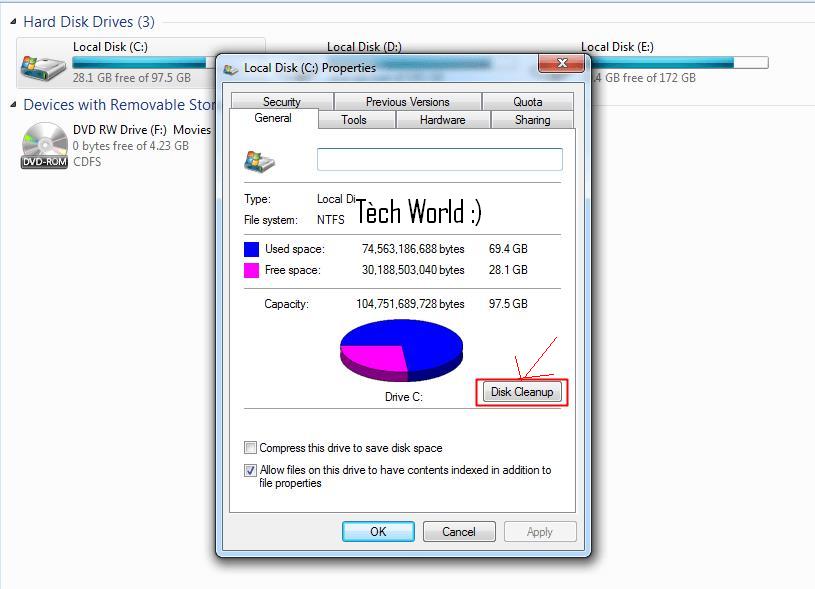
*Disk CleanUp :

These compact property in the Windows system that allows you to always clean up your hard drive and operating system files that are not needed in order to run faster, you just have to go to any Partition from your computer disc and pressure Right-click to get the list Properties or Properties and then select Disk .
Cleanup in the General tab
*Stop the services is important:
There are some special services of various applications are running and always what you slow down the machine so large that were not in need of such services and applications, so you press the ALT buttons + CTRL + DELETE to start off the programs and services that unnecessary application torrent that works even in the caseWe do not need it, for example.
*Use the applications help as Ccleaner:
Un grand nombre de fois où il peut aider applications vont bien pour vous aider à nettoyer le système et le disque dur et aussi nettoyer les erreurs de registre et beaucoup d'autres choses, vous avez juste à utiliser une application telle que Bohdha Ccleaner. 
* Virus Removal:

Viruses, malware and his job is tampering with your computer and its speed and performance as well so you have to get a software that allows you to remove these malicious files such as MalwareBytes and other popular programs to remove malicious files from your computer, such as AVG, NOD 

The best way to speed up your computer system and Windows maximum 2016

There are things that make fast your computer system and Windows maximum:

Operating systems are always good and fast immediately after his inauguration directly on your computer, especially Windows system but it is disturbing to many users, this does not last long and it becomes a nightmare difficult to get rid of it with a weak performance of the system as a whole.
But today you 8 tips that can make your computer quickly as it was in the beginning and perhaps also faster than the previoup

*Remove the programs you do not use:
You should always go to the center's control system and start to remove those programs that do not use Pantzam.vi a lot of times you might install programs on your computer to be used once or more, but not continue to be used after that, and despite the fact that those applications do not use at all, but it operates space from your computer hard disk, but there are many special services such programs work in the background of the computer, which makes it heavier on the shoulders of processor and memory your computer random
*The closure of the programs that start with the open system:
There is a great and a huge number of programs available for Windows that you just installed on your computer tries to start working during the beginning of the take-off system to operate as soon as the user access to the operating system and the desktop.

But this is also a big load on your computer and its ability to process the data, but also delay the boot process, so you should go to Start and type "msconfig" list, and then begin to close the applications that do not need to take off with the boot your operating system.
*Disk CleanUp :

These compact property in the Windows system that allows you to always clean up your hard drive and operating system files that are not needed in order to run faster, you just have to go to any Partition from your computer disc and pressure Right-click to get the list Properties or Properties and then select Disk .
Cleanup in the General tab
*Stop the services is important:
There are some special services of various applications are running and always what you slow down the machine so large that were not in need of such services and applications, so you press the ALT buttons + CTRL + DELETE to start off the programs and services that unnecessary application torrent that works even in the caseWe do not need it, for example.
*Use the applications help as Ccleaner:
Un grand nombre de fois où il peut aider applications vont bien pour vous aider à nettoyer le système et le disque dur et aussi nettoyer les erreurs de registre et beaucoup d'autres choses, vous avez juste à utiliser une application telle que Bohdha Ccleaner. 
* Virus Removal:

Viruses, malware and his job is tampering with your computer and its speed and performance as well so you have to get a software that allows you to remove these malicious files such as MalwareBytes and other popular programs to remove malicious files from your computer, such as AVG, NOD 

Most Powerful Surface Book and Pro 4 Models Now Available, Alongside a Gold Surface Pen:
Microsoft this morning announced that previously-promised high-end versions of Surface Book and Surface Pro 4 that feature 1 TB of storage are now available for orderAnd as an added bonus, Surface fans can pick up a new gold version of the Surface Pen as well
This new Surface Book will be available online-only via Microsoft Stores and other select retailers Microsoft explains. The new Surface Pro 4 will be available in Microsoft stores and through select retailers
These products are only available in the United States and Canada, at least for now. But Microsoft had previously announced its plans to bring the new devices to more markets in 2016.
More specifically, Surface Book today picks up a new $3200 configuration that includes a Core i7 processor, 16 GB of RAM, 1 TB of solid-state storage, and discrete graphics.
For Surface Pro 4, you need to custom configure the device to get up to 1 TB of storage: A similarly configured Pro 4, with a Core i7 processor, 16 GB of storage, and 1 TB of RAM costs $2700. (Discrete graphics are not available on Pro 4.) And this is the only option if want 1 TB of storage: You need to configure the Core i7 processor and 16 GB RAM options first.

Given what’s happening with Surface Book and Surface Pro 4, you may want to hold off before plunking down that much money. My guess is that Microsoft can and will solve the reliability issues with firmware updates. But it’s not clear what the timing will be.

Additionally, Microsoft announced a new gold Surface Pen, which is available now in Canada, Denmark, Finland, Italy, Norway, Poland, Portugal, Spain, Sweden, and the United States. It joins the previously-available silver, black, and dark blue versions,  

Most Powerful Surface Book 2016

Most Powerful Surface Book and Pro 4 Models Now Available, Alongside a Gold Surface Pen:
Microsoft this morning announced that previously-promised high-end versions of Surface Book and Surface Pro 4 that feature 1 TB of storage are now available for orderAnd as an added bonus, Surface fans can pick up a new gold version of the Surface Pen as well
This new Surface Book will be available online-only via Microsoft Stores and other select retailers Microsoft explains. The new Surface Pro 4 will be available in Microsoft stores and through select retailers
These products are only available in the United States and Canada, at least for now. But Microsoft had previously announced its plans to bring the new devices to more markets in 2016.
More specifically, Surface Book today picks up a new $3200 configuration that includes a Core i7 processor, 16 GB of RAM, 1 TB of solid-state storage, and discrete graphics.
For Surface Pro 4, you need to custom configure the device to get up to 1 TB of storage: A similarly configured Pro 4, with a Core i7 processor, 16 GB of storage, and 1 TB of RAM costs $2700. (Discrete graphics are not available on Pro 4.) And this is the only option if want 1 TB of storage: You need to configure the Core i7 processor and 16 GB RAM options first.

Given what’s happening with Surface Book and Surface Pro 4, you may want to hold off before plunking down that much money. My guess is that Microsoft can and will solve the reliability issues with firmware updates. But it’s not clear what the timing will be.

Additionally, Microsoft announced a new gold Surface Pen, which is available now in Canada, Denmark, Finland, Italy, Norway, Poland, Portugal, Spain, Sweden, and the United States. It joins the previously-available silver, black, and dark blue versions,  

There are those who want to learn the ethical hacker to win money from a loophole companies and there are those who want to professionalism for protection or for other purposes lymphocytes and a lot of the Muslim Brotherhood want to learn ethical hacker but it is difficult to find suitable sites to learn ethical hacker so I will give you some foreign sites which allow you to learn the arts hacker moral
This is a list of some websites that you can use it in the field of learning ethical hacker

The first location:
 http://www.breakthesecurity.cysecurity.org


Site other middle:
  http://www.hacking-tutorial.com

 Site Altalt:
  https://www.evilzone.org

  Site IV:
http://wwwhackaday.com

The best sites to teach arts hacker moral CEH 2015-2016

There are those who want to learn the ethical hacker to win money from a loophole companies and there are those who want to professionalism for protection or for other purposes lymphocytes and a lot of the Muslim Brotherhood want to learn ethical hacker but it is difficult to find suitable sites to learn ethical hacker so I will give you some foreign sites which allow you to learn the arts hacker moral
This is a list of some websites that you can use it in the field of learning ethical hacker

The first location:
 http://www.breakthesecurity.cysecurity.org


Site other middle:
  http://www.hacking-tutorial.com

 Site Altalt:
  https://www.evilzone.org

  Site IV:
http://wwwhackaday.com


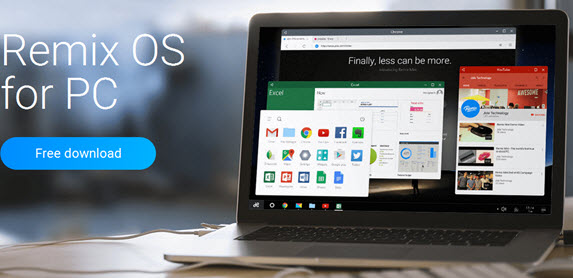
Système OS Remix .. est la meilleure solution pour exécuter les applications sur votre ordinateur:
De nombreux utilisateurs souffrent au cours de la période à venir de leur expérience différents programmes à exécuter le système Android sur l'ordinateur tels que "Bluestacks" qui a été fait à plusieurs problèmes pendant une longue période.
Mais la société Jide qui fournit la meilleure solution pour profiter applications et jeux Android sur l'ordinateur comme le système d'exploitation et l'installer près d'un autre Windows ou Mac et fonctionnalité en elle, elle offre une meilleure expérience pour les utilisateurs d'ordinateurs de bureau.

The company issued its "Remix OS 2.0" area 692.15MB you can install the system on flash memory and use it on any external monitor or a television set to listen system always in your hand.

La meilleure solution pour exécuter les applications sur votre ordinateur 2016

Système OS Remix .. est la meilleure solution pour exécuter les applications sur votre ordinateur:
De nombreux utilisateurs souffrent au cours de la période à venir de leur expérience différents programmes à exécuter le système Android sur l'ordinateur tels que "Bluestacks" qui a été fait à plusieurs problèmes pendant une longue période.
Mais la société Jide qui fournit la meilleure solution pour profiter applications et jeux Android sur l'ordinateur comme le système d'exploitation et l'installer près d'un autre Windows ou Mac et fonctionnalité en elle, elle offre une meilleure expérience pour les utilisateurs d'ordinateurs de bureau.

The company issued its "Remix OS 2.0" area 692.15MB you can install the system on flash memory and use it on any external monitor or a television set to listen system always in your hand.

"Portable Update" program helps you to update Windows 10 without Internet:

Some usershave problems in the Internet connection needs to update the system, and there is an application that helps to download the update files for Windows 10 from another device and then install them on your computer.
We usually update the system via Windows Update is located in the Control Panel application Control panel, but "Portable Update" program will enable us to download the original files from Microsoft's update servers.
You can later install these updates on your computer allows you to choose which updates you want to install and then start downloaded and will not need to connect to the Internet later to install these updates.
The program supports Windows 7.8.10 and Windows Server and you can download it from
over here : www.portableupdate.com

Comment pouvez-vous mettre à jour de Windows 10 sans Internet 2016

"Portable Update" program helps you to update Windows 10 without Internet:

Some usershave problems in the Internet connection needs to update the system, and there is an application that helps to download the update files for Windows 10 from another device and then install them on your computer.
We usually update the system via Windows Update is located in the Control Panel application Control panel, but "Portable Update" program will enable us to download the original files from Microsoft's update servers.
You can later install these updates on your computer allows you to choose which updates you want to install and then start downloaded and will not need to connect to the Internet later to install these updates.
The program supports Windows 7.8.10 and Windows Server and you can download it from
over here : www.portableupdate.com

Maybe free software may differ from paid programs in being without a fee, and this could encourage many users to use it and perhaps it may be the biggest reason is to get rid of the nuisance issue licenses and pirated copies, when you install Free Protection Program will enjoy the protection of your device and is free without any Problems.At first you have to know that protection programs are already performing quite a bit, it protects your computer from a lot of viruses and harmful software, but the logical truth that must be found that it can not be compared to paid software programs free at all, and can not believe that she may be in the same level, but perhaps it may be the serious flaws that could allow the leaking of malware Malwares cause serious damage to your device may possibly be more than what you would pay for copying paid.
Programmes payés pas parfait, et il n'y a pas de vérité dans le programme de protection à 99%, même si enrôlé le meilleur programme de protection a également exposé à la pénétration ou l'exposition à des virus, mais il ya quelques points qui sont caractérisés par les programmes libres payés, à savoir

Technical support:

Of the most important features of paid software, where you can use technical support when your exposure to any dangers or problems, and possibly users' attention to this point led some companies to provide technical support services (advanced) paid more than the average support, free security software usually where technical support is not available good and perhaps may be limited to some simple correspondence, this is definitely a logical, because this is needed to staff, equipment and capabilities in order to provide this service, and therefore will not companies that give free protection programs to provide these services free of charge.

:Most companies have a free paid version
Most companies that provide free protection programs such as: Avast and AVG and Avira and Comodo, and PC Tools already has a paid version, and sometimes what you withhold some properties and make them available only in copies paid, certainly will not deal with free user such as the user who pay for them, as well as possibly some users may be exposed for the inconvenience as a result of messages in the program 
encourages users to experience paid back

Palaces in free software technologies:
Free software provides a minimum level of protection, but do not use sophisticated techniques to this matter such as paid. For example: most free antivirus software that we tested the update on its database are available only once a day process. For example, free security software from Microsoft (plus al Asasnclz Security Essetials) also will scan suspicious models that do not have well-known formula pre-installed, and this is done through the operation of the model and its conformity over the last formulas installed directly on the Internet.Program (Panda Panda) scans everything on your company's server Server on the Internet, means that the screening process only works as long as you are connected to the Internet, and in the case were not connected to the program by reference to the local memory (Caches)Some of those free software contains less effective than those paid the price screening tools which are usually from the same company produced, for example, paid protection program the price of (Avira Avira) scans HTTP packets to catch any suspicious object before it reaches the hard drive, in contrast The free software from the same company that does not contain that property!Also protection program (er in G AVG) paid the price associated programs (IM) for greater protection, at a time when this property does not exist in the free version!Some of these free programs give you stuff you do not need it. For example, it is installed both AVG and Comodo default situation with the toolbar to search in social networks, and there are many of these free applications that display advertising encourages you to buy the full version and paid the price. Avira Avira, for example, is the most harassed in this matter through the window that appears daily during the update. But the free versions of each of Avast Avast, AVG, and PC Tools ads appear only in some models 


Risk free security software 2016

Maybe free software may differ from paid programs in being without a fee, and this could encourage many users to use it and perhaps it may be the biggest reason is to get rid of the nuisance issue licenses and pirated copies, when you install Free Protection Program will enjoy the protection of your device and is free without any Problems.At first you have to know that protection programs are already performing quite a bit, it protects your computer from a lot of viruses and harmful software, but the logical truth that must be found that it can not be compared to paid software programs free at all, and can not believe that she may be in the same level, but perhaps it may be the serious flaws that could allow the leaking of malware Malwares cause serious damage to your device may possibly be more than what you would pay for copying paid.
Programmes payés pas parfait, et il n'y a pas de vérité dans le programme de protection à 99%, même si enrôlé le meilleur programme de protection a également exposé à la pénétration ou l'exposition à des virus, mais il ya quelques points qui sont caractérisés par les programmes libres payés, à savoir

Technical support:

Of the most important features of paid software, where you can use technical support when your exposure to any dangers or problems, and possibly users' attention to this point led some companies to provide technical support services (advanced) paid more than the average support, free security software usually where technical support is not available good and perhaps may be limited to some simple correspondence, this is definitely a logical, because this is needed to staff, equipment and capabilities in order to provide this service, and therefore will not companies that give free protection programs to provide these services free of charge.

:Most companies have a free paid version
Most companies that provide free protection programs such as: Avast and AVG and Avira and Comodo, and PC Tools already has a paid version, and sometimes what you withhold some properties and make them available only in copies paid, certainly will not deal with free user such as the user who pay for them, as well as possibly some users may be exposed for the inconvenience as a result of messages in the program 
encourages users to experience paid back

Palaces in free software technologies:
Free software provides a minimum level of protection, but do not use sophisticated techniques to this matter such as paid. For example: most free antivirus software that we tested the update on its database are available only once a day process. For example, free security software from Microsoft (plus al Asasnclz Security Essetials) also will scan suspicious models that do not have well-known formula pre-installed, and this is done through the operation of the model and its conformity over the last formulas installed directly on the Internet.Program (Panda Panda) scans everything on your company's server Server on the Internet, means that the screening process only works as long as you are connected to the Internet, and in the case were not connected to the program by reference to the local memory (Caches)Some of those free software contains less effective than those paid the price screening tools which are usually from the same company produced, for example, paid protection program the price of (Avira Avira) scans HTTP packets to catch any suspicious object before it reaches the hard drive, in contrast The free software from the same company that does not contain that property!Also protection program (er in G AVG) paid the price associated programs (IM) for greater protection, at a time when this property does not exist in the free version!Some of these free programs give you stuff you do not need it. For example, it is installed both AVG and Comodo default situation with the toolbar to search in social networks, and there are many of these free applications that display advertising encourages you to buy the full version and paid the price. Avira Avira, for example, is the most harassed in this matter through the window that appears daily during the update. But the free versions of each of Avast Avast, AVG, and PC Tools ads appear only in some models 


There is a problem of higher consumption of the computer processor is common among many users, you may notice while working on the machine that the voice processor fan or Albroosissour became High abnormally where that fan launches full capacity in cooling the processor and this indicates the presence of consumption of high processor either and this What was confirmed in the first point in the essay solution Loudness problem of fan Albroosissour where the wizard multiple operations at one time, which affects negatively on the performance of the computer, and in case if you are one of those who is facing this issue let me tell you in this subject for some different solutions to overcome those The problem.

1. Turn off the most consumed operations:


Perhaps the high consumption of the processor because of the presence of processes running in the background is the cause of this problem, and you can easily find out more operations consumption system processor without programs using Task Manager Task Manager content in the Windows system and run press buttons Ctrl + Shift + Esc on your keyboard to show window Altsk Manager, would press tab Processes and then press the CPU section of the top begins in more operations sort that consumes processor of the most even the least it is better not to end the most practical consumption system may have been related to the system so you can squeeze it right and press the search online to search for This process on the Internet and find out if they belong to program

2. Keep your definitions interlocutor:

You must update your device definitions is a great influential factor for the normal efficiency of your computer and in particular the definition of the display card, you should check permanently you got the latest version of the computer definitions using either updated definitions programs or to go through should The Device Manager and go to some important definitions such as graphics cards, sound and online that they updated the latest version by clicking right click it and then press the Update Driver to look for another online version.

3. accelerating take-off and closure of the programs that start with Windows:

By simply pressing the power switch on your computer and start Windows in the take-off will also start with running a range of programs you do not feel it or do not put it in mind as it works silently, or you will notice the presence of icons such programs in the taskbar next to the clock, you have these programs close it not only helps solve the problem of consumption of the processor but also to accelerate the take-off process as we reviewed in an article 7 steps to increase the take-off speed of the computer and other means to do so.

4. Close unused programs:

While using the computer for a long time do not doubt that you are running many different programs but forget to close it after use and perform for this program function, which will use the processor heavily and some machine resources and other especially if the heavy game or image-editing program or Web browser such as Photoshop or one Microsoft Services Oovis..ogerh easiest way to reduce the consumption of the processor either is closed upon completion of use or will use later.

5. Use Synei program:


Synei program is a free program characteristic speed up your computer but not the maintenance of the machine, but to stop the operating system services unnecessary where be disabled in order to obtain better performance and also to reduce the consumption of device resources, when you run it, we will find that it contains three choices above P Default settings is that you can adjust the software to activate the services that have been disabled incorrectly in the system or cause problems, either Safe optimization is to disable most of the Windows services that run in the background and the user means something a destination of your use of the program, either Maximum Optimization is an option I would advise not to be activated where all services disabled Windows only necessary to keep but sometimes causes problems for the system, and then select one of these option Press the button to Optimize began to disable services.

Finally, restart your computer each period:


Better solutions to the problem of high CPU consumption 2016

There is a problem of higher consumption of the computer processor is common among many users, you may notice while working on the machine that the voice processor fan or Albroosissour became High abnormally where that fan launches full capacity in cooling the processor and this indicates the presence of consumption of high processor either and this What was confirmed in the first point in the essay solution Loudness problem of fan Albroosissour where the wizard multiple operations at one time, which affects negatively on the performance of the computer, and in case if you are one of those who is facing this issue let me tell you in this subject for some different solutions to overcome those The problem.

1. Turn off the most consumed operations:


Perhaps the high consumption of the processor because of the presence of processes running in the background is the cause of this problem, and you can easily find out more operations consumption system processor without programs using Task Manager Task Manager content in the Windows system and run press buttons Ctrl + Shift + Esc on your keyboard to show window Altsk Manager, would press tab Processes and then press the CPU section of the top begins in more operations sort that consumes processor of the most even the least it is better not to end the most practical consumption system may have been related to the system so you can squeeze it right and press the search online to search for This process on the Internet and find out if they belong to program

2. Keep your definitions interlocutor:

You must update your device definitions is a great influential factor for the normal efficiency of your computer and in particular the definition of the display card, you should check permanently you got the latest version of the computer definitions using either updated definitions programs or to go through should The Device Manager and go to some important definitions such as graphics cards, sound and online that they updated the latest version by clicking right click it and then press the Update Driver to look for another online version.

3. accelerating take-off and closure of the programs that start with Windows:

By simply pressing the power switch on your computer and start Windows in the take-off will also start with running a range of programs you do not feel it or do not put it in mind as it works silently, or you will notice the presence of icons such programs in the taskbar next to the clock, you have these programs close it not only helps solve the problem of consumption of the processor but also to accelerate the take-off process as we reviewed in an article 7 steps to increase the take-off speed of the computer and other means to do so.

4. Close unused programs:

While using the computer for a long time do not doubt that you are running many different programs but forget to close it after use and perform for this program function, which will use the processor heavily and some machine resources and other especially if the heavy game or image-editing program or Web browser such as Photoshop or one Microsoft Services Oovis..ogerh easiest way to reduce the consumption of the processor either is closed upon completion of use or will use later.

5. Use Synei program:


Synei program is a free program characteristic speed up your computer but not the maintenance of the machine, but to stop the operating system services unnecessary where be disabled in order to obtain better performance and also to reduce the consumption of device resources, when you run it, we will find that it contains three choices above P Default settings is that you can adjust the software to activate the services that have been disabled incorrectly in the system or cause problems, either Safe optimization is to disable most of the Windows services that run in the background and the user means something a destination of your use of the program, either Maximum Optimization is an option I would advise not to be activated where all services disabled Windows only necessary to keep but sometimes causes problems for the system, and then select one of these option Press the button to Optimize began to disable services.

Finally, restart your computer each period: